A Platform Made for Collaboration
Localization is built on relationships. Internal specialists, external vendors, translators, reviewers, client stakeholders, project managers, and owners all contribute different expertise to the same delivery. Gaia was designed to support those existing relationships in a controlled workspace rather than force teams into disconnected tools and reporting processes.
The Team section gives managers a project-by-project view of who is involved, which languages have production coverage, which roles remain unclaimed, and whether invitations have been accepted. That shared picture helps managers address staffing problems before they become quality or schedule problems.
Visibility Before Coordination
A name on a spreadsheet does not always mean that a project is covered. The person may not have accepted an invitation, the assignment may be attached to the wrong language, or a project may have a translator but no reviewer. Managers need to distinguish membership from actual role coverage.
Gaia brings those signals together. The roster does not replace direct conversations about workload or team well-being, but it gives managers better evidence for those conversations. When combined with project progress, delivery dates, and broader capacity planning, it becomes easier to identify where support, redistribution, or a revised schedule may be needed.
Reading the Team Roster Overview
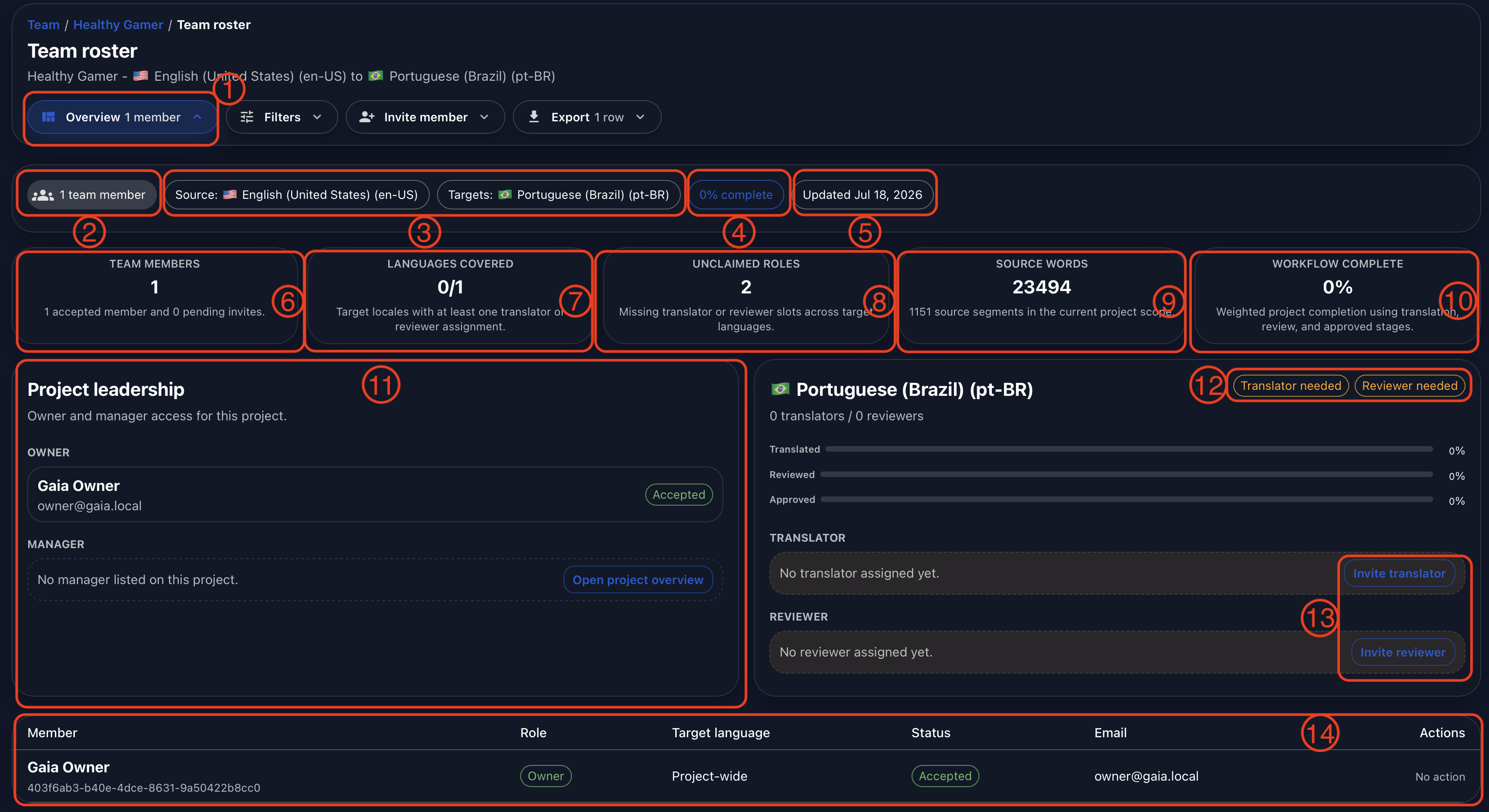
Open Overview (1) to understand the project’s current coverage. The project summary immediately below the main header shows the number of team members, including the owner (2), the source and target languages in scope (3), weighted project completion (4), and the date of the latest project update (5).
The next row turns the roster into a set of operational signals. Team Members (6) distinguishes accepted members from pending invitations. Languages Covered (7) shows how many target locales have at least one translator or reviewer. Unclaimed Roles (8) counts missing translator or reviewer slots across the target languages. Source Words (9) shows the volume in the current project scope, and Workflow Complete (10) summarizes weighted progress across translation, review, and approval.
These cards should be read together. A project can have several members and still lack coverage for a critical language or workflow role. Likewise, a large word count with unclaimed roles may require more immediate attention than the member total alone suggests.
Leadership and Language Coverage in One View
The Project Leadership panel (11) identifies the current owner and managers. This makes escalation paths visible without requiring users to search through account settings or external documentation.
Each target language receives its own coverage card. If a language does not have a translator or reviewer, Gaia displays that gap clearly (12). Authorized users can start an invitation for the missing translator or reviewer directly from the language card (13), keeping the staffing action connected to the exact language that needs coverage.
The roster table at the bottom (14) lists current members beside their role, target language, invitation status, email, and available actions. Project-wide roles appear without a target language, while translators and reviewers remain connected to the language they are assigned to support.
Finding the Right Person or Assignment
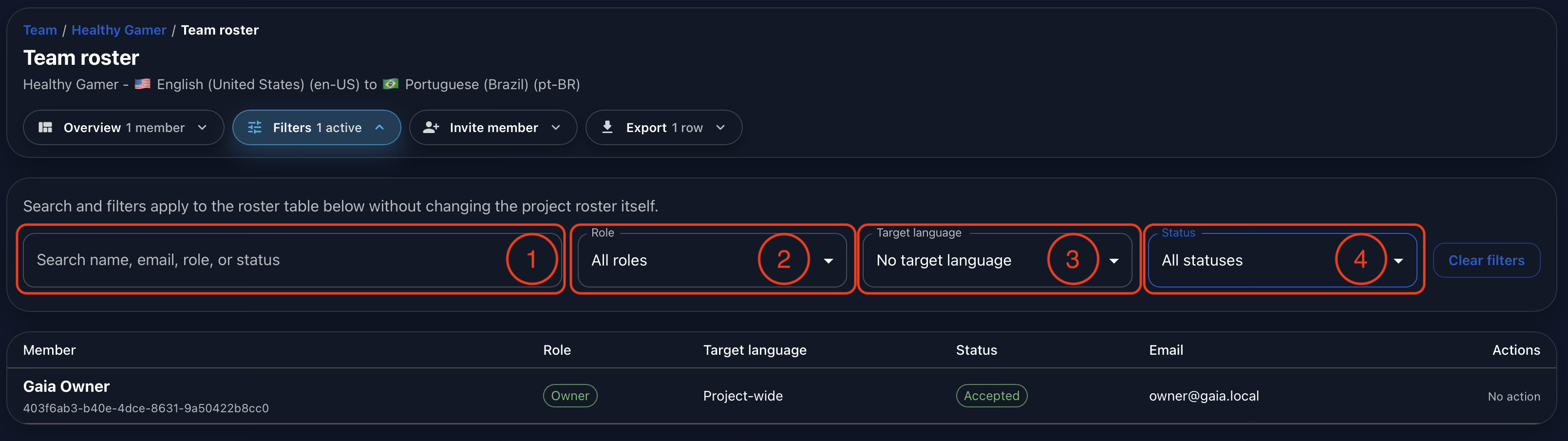
Open Filters to narrow the roster without changing the roster itself. The search field (1) can find a member by name, email, role, or status. The Role filter (2) isolates owners, managers, translators, reviewers, or client reviewers.
Use Target Language (3) to show all target languages, one specific locale, or members with no target language. The last option is useful for project-wide roles such as an owner or manager. Status (4) separates accepted members, invitations that are still awaiting a response, and missing assignments that have not yet been claimed.
Filters can be combined to answer specific operational questions. A manager could look for pending reviewers in one language, confirm all accepted client reviewers, or isolate project-wide leadership before sharing a roster update.
Inviting a Team Member from Gaia
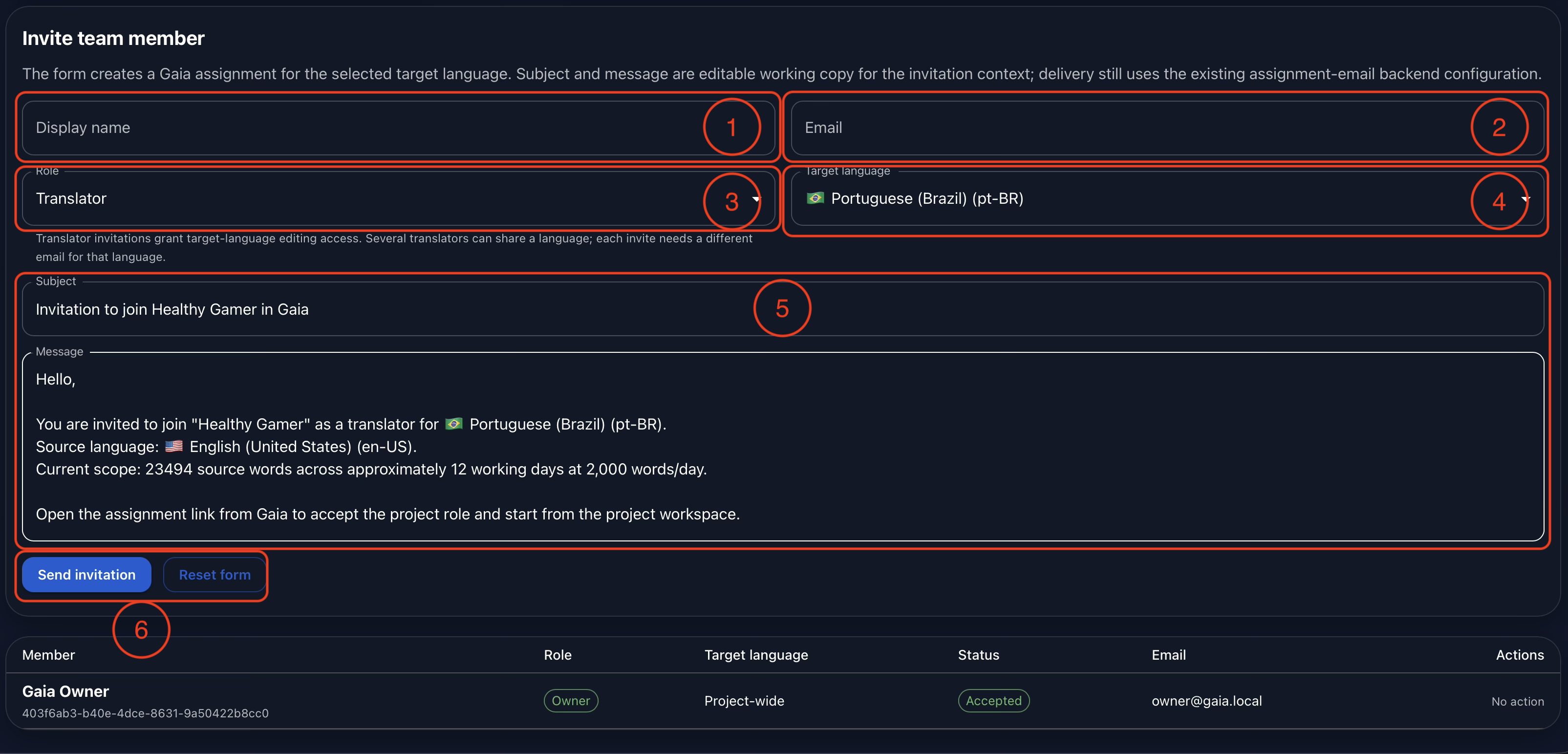
If company policy allows direct invitations, open Invite Member and enter the collaborator’s display name (1) and email address (2). Choose the role that defines their project access (3), then select the target language when the assignment is language-specific (4).
Gaia prepares an editable subject and message using the project, role, language, and available scope information (5). This reduces repetitive administrative work while still allowing the sender to review and adapt the invitation before delivery.
Select Send Invitation (6) when the assignment is correct. Gaia creates the selected project assignment and uses the organization’s configured assignment-email backend for delivery. If that backend is not connected, an administrator must complete the email configuration before invitations can be delivered as intended.
Keeping Invitations Controlled
Invitations affect project access, so efficiency should not remove review. Before sending, confirm the recipient, role, target language, and scope described in the message. Several translators can share a language when the workflow requires it, but each invitation should use the correct individual email and assignment.
This balance is central to Gaia’s collaboration model. The platform reduces repeated setup work, while organizations retain control over who may invite users, which roles they may assign, and how invitation emails are delivered.
Exporting the Visible Roster
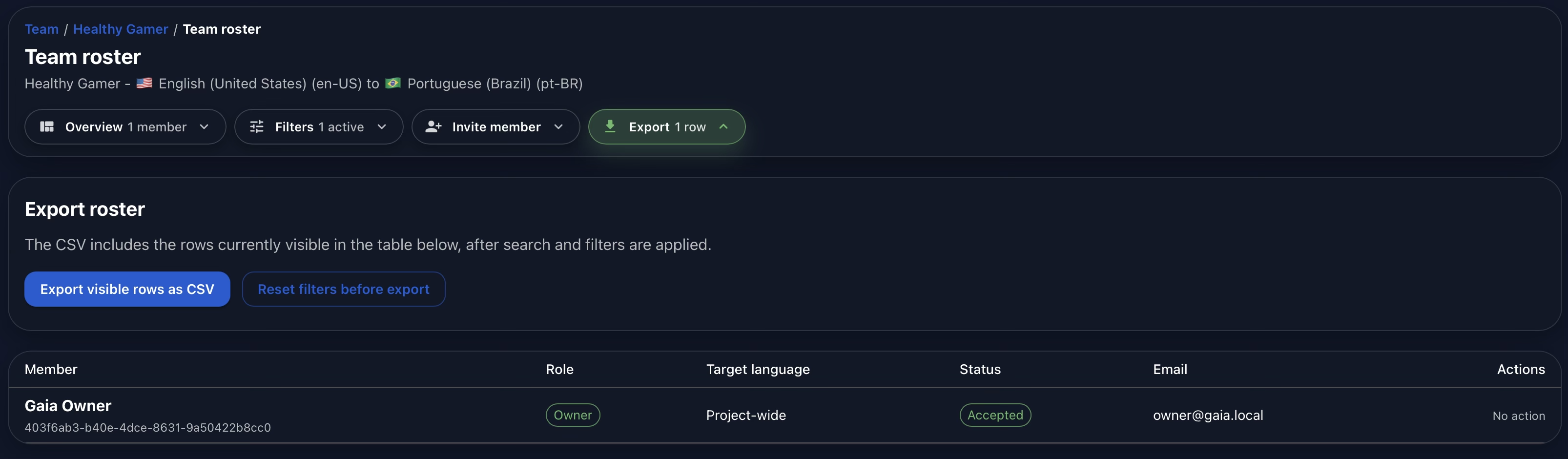
Open Export when the roster needs to be reviewed outside Gaia. The CSV contains the rows currently visible in the table after search and filters are applied. This makes it possible to export a focused list for one language, role, or status rather than sharing unrelated project membership.
Select Export Visible Rows as CSV to download the current result. If the complete roster is required, clear the active filters first. The member table remains visible below the export controls so users can confirm exactly which rows will be included before creating the file.
From Roster Data to Sustainable Planning
A roster becomes valuable when it supports action. Missing-role indicators can trigger recruitment or reassignment. Pending invitations can prompt follow-up. Language filters can expose incomplete coverage, and project scope can help managers judge whether the assigned team is proportionate to the work ahead.
These signals should support, not replace, human management. Gaia can show that a role is missing or that a project carries a large scope, but managers still need to speak with team members about availability, complexity, and workload. Better visibility creates the opportunity to protect both delivery quality and sustainable working conditions.
Conclusion
Gaia Team connects project membership, leadership, language coverage, workflow progress, invitations, filters, and export in one controlled environment. Managers can understand who is participating, identify missing roles, invite the right collaborator, and share the relevant roster without maintaining a separate staffing spreadsheet.
The result is faster coordination with stronger operational clarity. Teams retain the relationships and professional judgement that make collaboration work, while Gaia provides the structure needed to address gaps promptly and keep projects moving toward high-quality, on-time delivery.
Watch the full demonstration below.
Full Demonstration
The video walks through the full Team workflow, from the roster overview and language coverage to invitations, member filters, and exporting the visible roster as CSV.
Follow Tomori Systems on YouTube, Instagram, TikTok, and LinkedIn for more Gaia updates.