
Sustainable Capacity Is a Quality System
One of localization management’s hardest responsibilities is protecting the conditions that make excellent work possible. Strong performers are often assigned first and most frequently. Without a clear portfolio view, that pattern can quietly become overwork, rushed decisions, or unplanned subcontracting. Meanwhile, other capable team members may receive too little work to stay engaged and connected to the program.
Balance is not simply an efficiency target. It supports focus, professional judgement, consistency, and sustainable collaboration. Gaia’s Resource Capacity view helps managers understand where demand is accumulating, where workflow roles remain unassigned, and where the time available no longer matches the work ahead.
These signals do not replace conversations about availability, complexity, or well-being. They give managers a shared operational picture so those conversations can happen earlier and lead to better decisions.
Open Resource Capacity from the Project Card
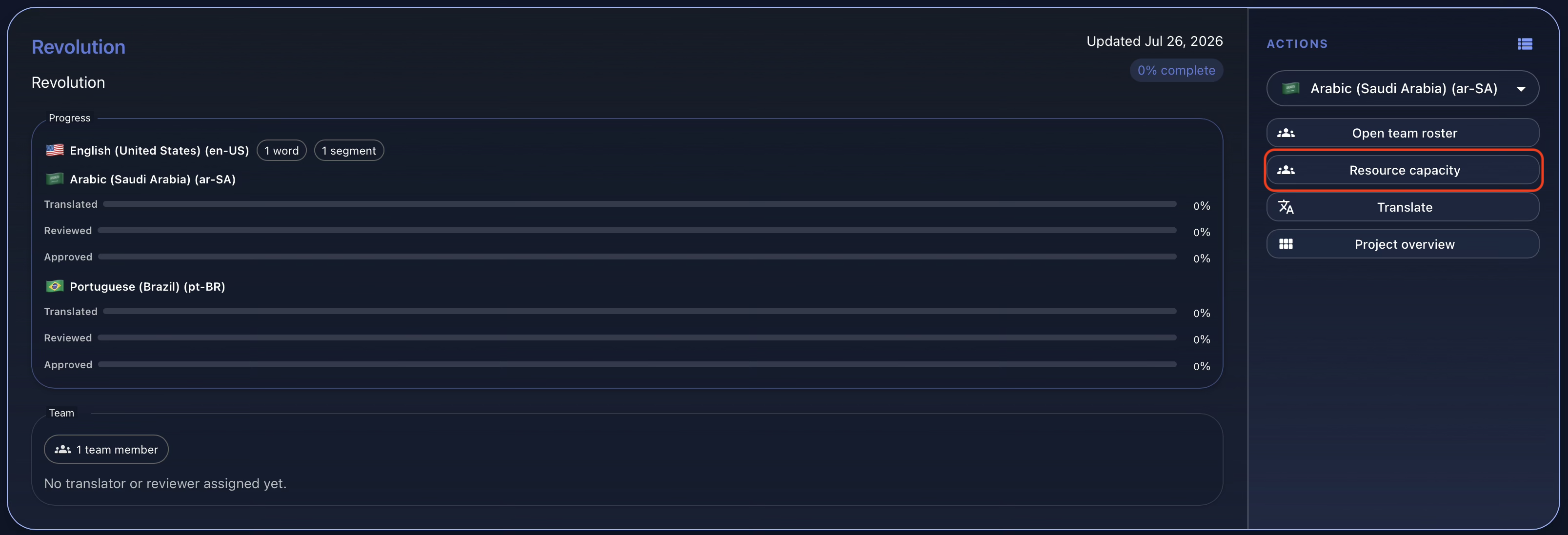
Open the relevant project card and select Resource capacity from the Actions panel. The resulting workspace brings portfolio-level indicators and detailed pressure views together under the Team section. From there, managers can move between the overview, languages, project-language workflows, contributors, and the calculation guide without leaving the planning context.
Start with the Portfolio Signals
The Overview begins with three cards designed for rapid triage. Pending Words (All Projects) shows the estimated source words still waiting for translation, review, or approval across active projects (1). Projects with Unassigned Roles identifies active project languages that still need an accepted translator or reviewer (2).
Critical Workflow Steps compares the days required to complete a project-language step with the days remaining before its delivery date (3). When the required effort is greater than the available time, Gaia flags the step as critical. Read together, the cards reveal overall volume, coverage gaps, and immediate schedule pressure at a glance.

See Where Demand Accumulates by Language
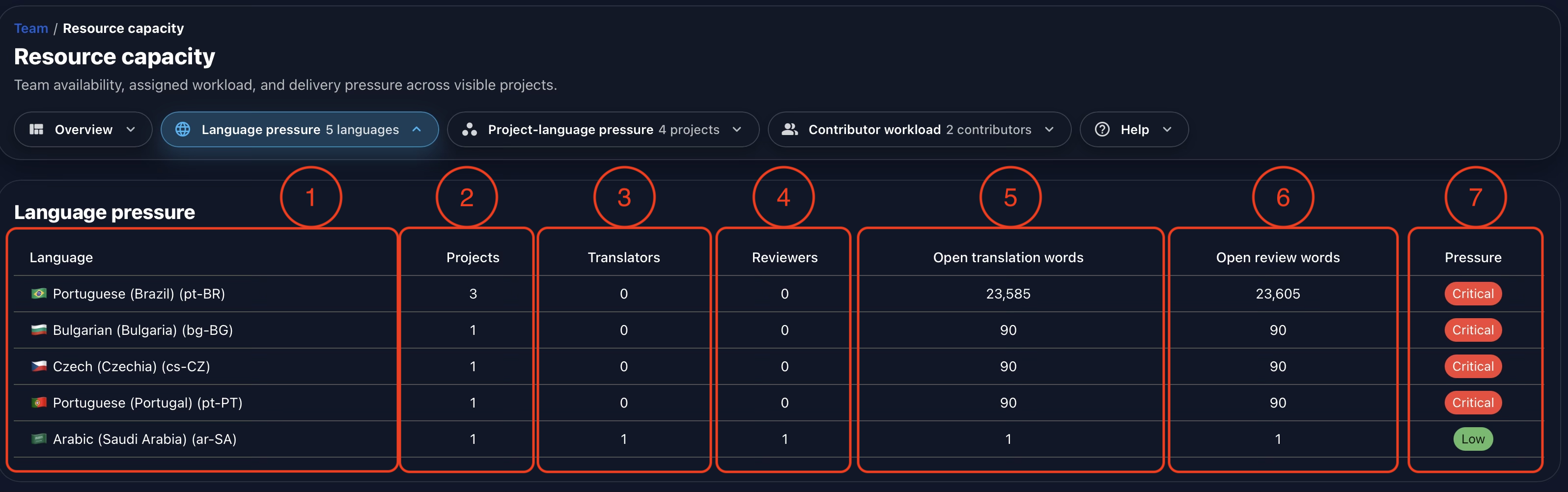
Language Pressure aggregates the work that needs attention by target language. In the example below, Portuguese (Brazil) is the most heavily demanded language: three projects contain more than 23,000 open translation words and more than 23,000 open review words, with no accepted translator or reviewer shown.
Each row includes the language (1), the number of active projects that need it (2), accepted translators (3), accepted reviewers (4), open translation words (5), open review words (6), and the resulting pressure level (7). An unassigned production role is treated as critical because available work cannot move through that stage without coverage.
This view helps distinguish a broad language-coverage problem from an isolated project issue. A language appearing across several projects may justify recruitment, vendor outreach, or a portfolio-wide redistribution instead of a one-project workaround.
Inspect Pressure Project by Project
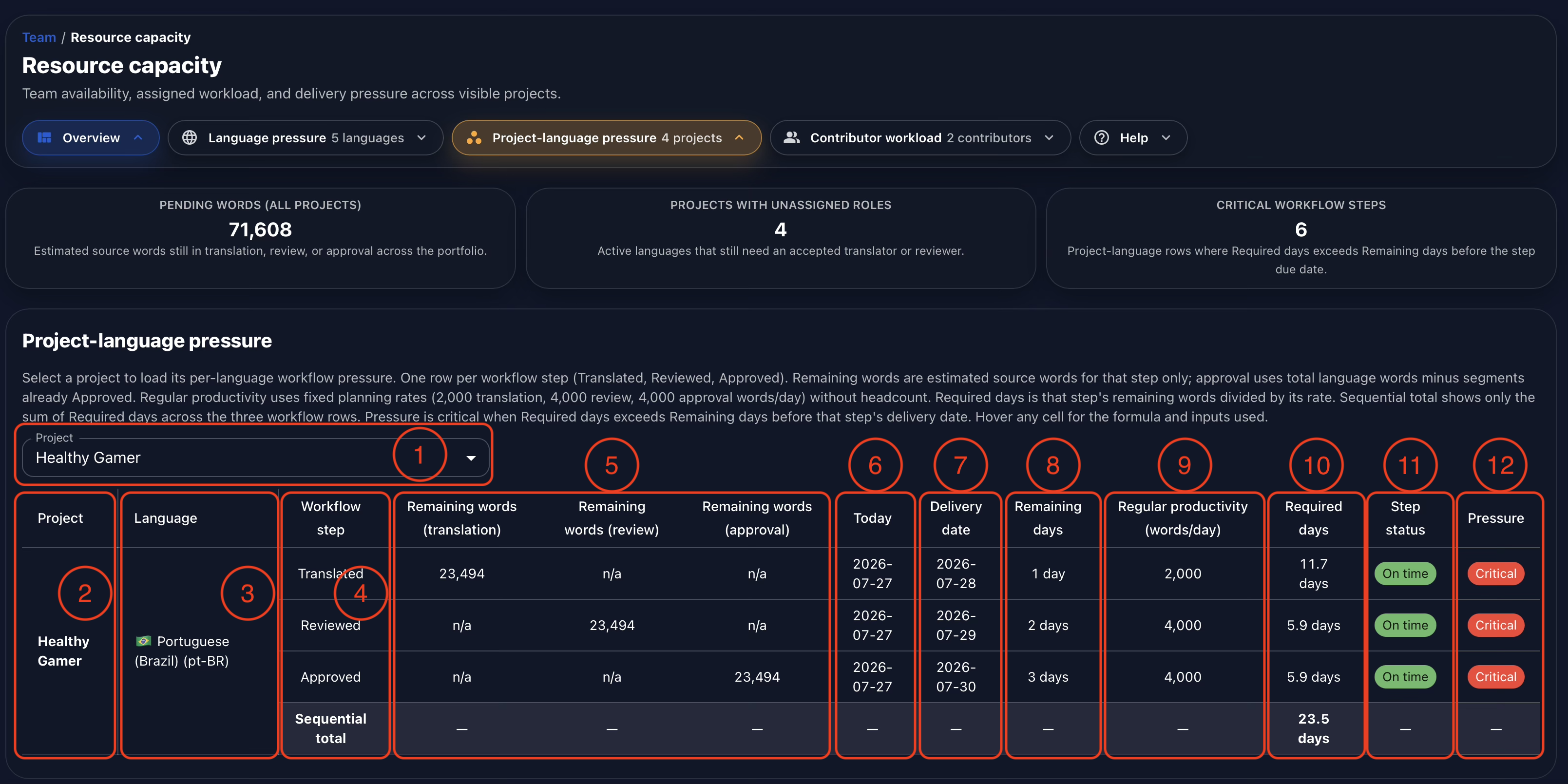
Project-language Pressure moves from portfolio patterns to the workflow steps of one selected project. Choose the project to analyze (1). The table then identifies the project (2), target language (3), and workflow step (4). Translation, review, and approval each receive a separate row so their schedules can be assessed independently.
The step-specific remaining-word columns show the volume still open for the applicable workflow (5). Gaia then displays today’s planning date (6), the step’s delivery date (7), and the remaining days between them (8). Regular Productivity provides the configured planning benchmark in words per day (9), while Required Days divides the remaining words by that benchmark (10).
Step Status reflects the workflow’s current deadline state (11), while Pressure compares the effort required with the time available (12). That distinction matters: a step may still be marked on time while already carrying critical pressure if its remaining work cannot be completed at the regular planning rate. The Sequential Total summarizes the required days across translation, review, and approval for a clearer view of the complete path to delivery.
Follow the Math, Not Just the Status Color
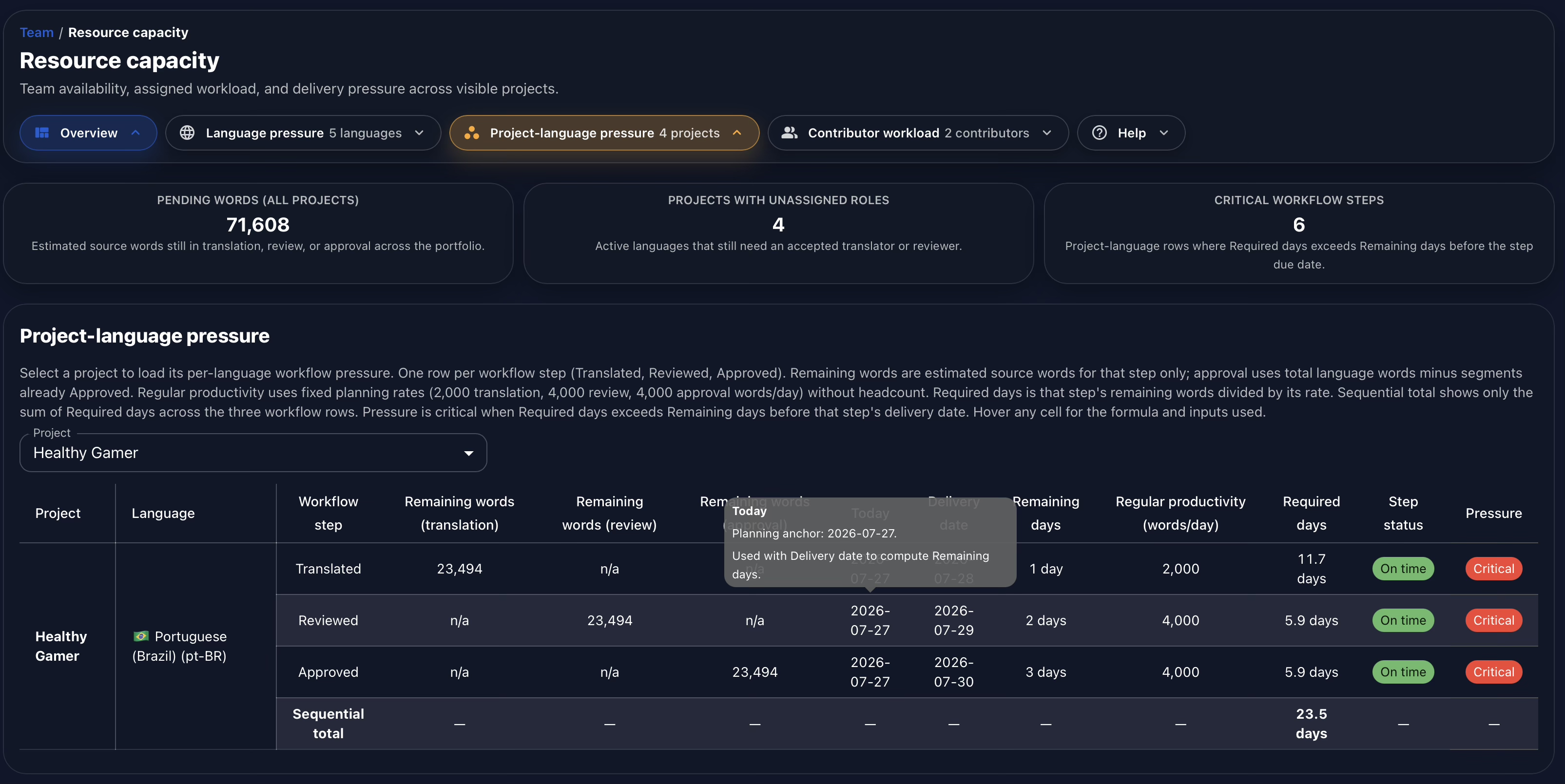
Every table cell exposes its calculation when hovered. The tooltip shows the formula, planning anchor, and inputs used for that value. This makes the report auditable: managers can understand why Gaia reached a pressure result instead of relying on an unexplained badge.
Transparent calculations also make planning assumptions easier to challenge constructively. If a project contains unusually complex content or a team uses different productivity benchmarks, managers can review the inputs and interpret the output in the context of the real work.
Balance Work from the Contributor Perspective
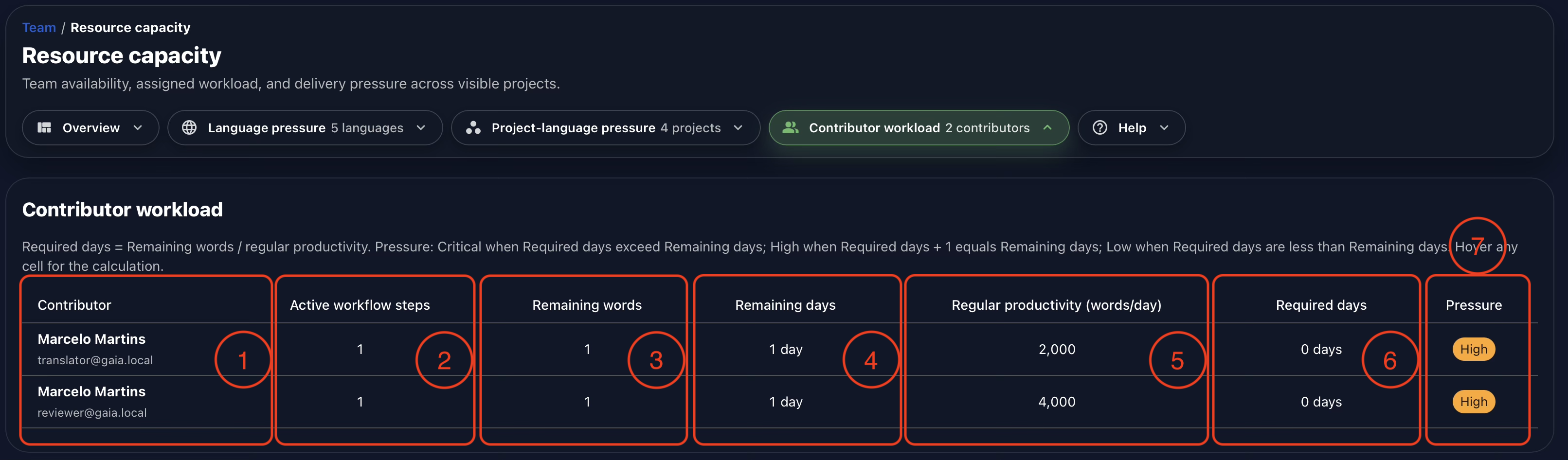
Contributor Workload reorganizes the same planning problem around the people doing the work. It helps managers identify contributors whose accepted assignments are becoming compressed and those who may have room to support additional work.
The table shows the contributor and assignment identity (1), active workflow steps (2), remaining words across those assignments (3), remaining calendar days (4), regular productivity in words per day (5), required working days at that planning rate (6), and the resulting pressure level (7). Hovering any cell reveals the corresponding calculation.
This view is a prompt for responsible management, not an instruction to fill every available hour. A useful reassignment still needs to account for content complexity, language expertise, project context, other commitments, and the contributor’s actual availability.
Know What the Capacity Model Counts
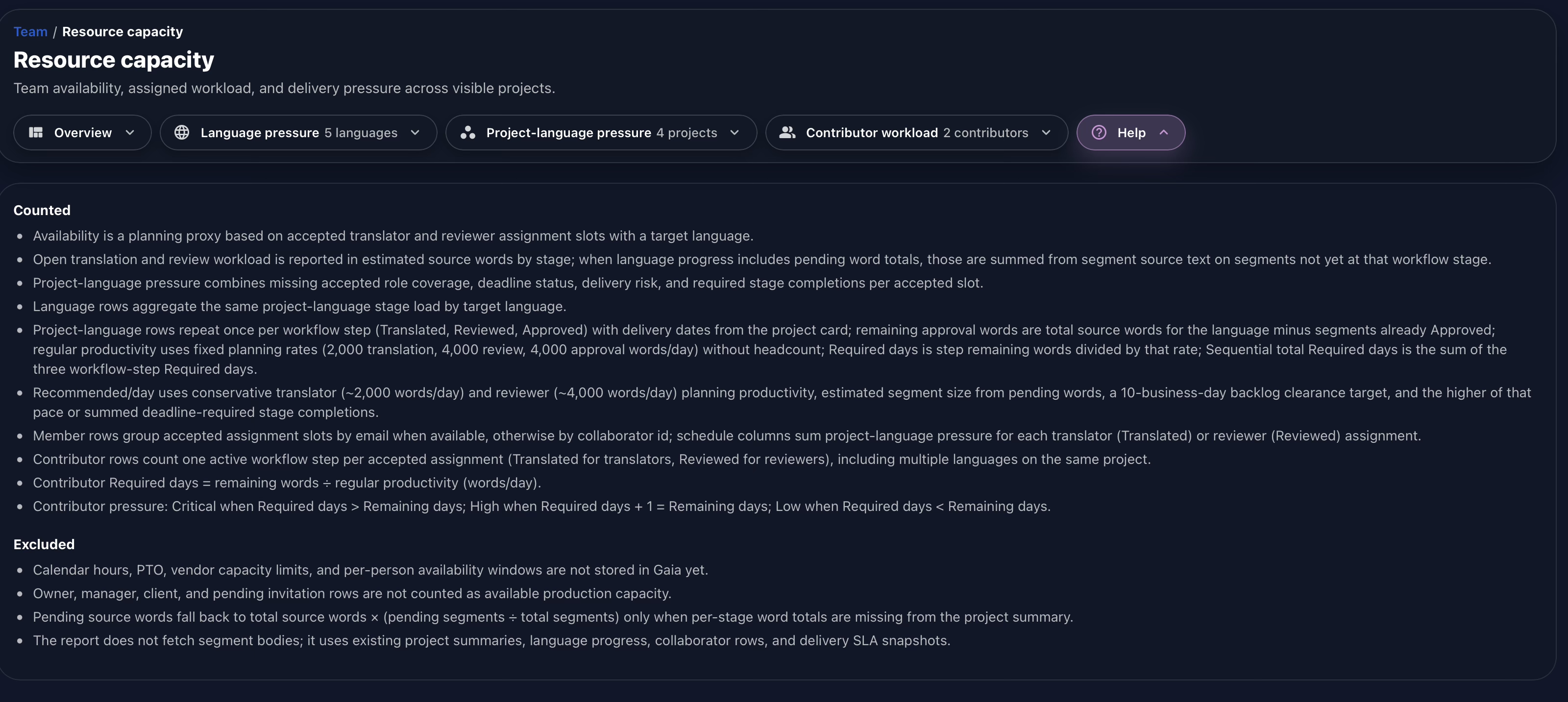
Open Help to see the rationale behind the entire Resource Capacity section. Gaia documents which assignments are counted, how pending words are estimated, how language and contributor rows are grouped, the regular productivity assumptions, and the formulas used for required days and pressure levels.
The Help section also states what is excluded. Calendar hours, paid time off, vendor capacity limits, and individual availability windows are not currently stored in Gaia. Owners, managers, clients, and pending invitations are not counted as production capacity. Making those boundaries explicit supports responsible use: the report is a transparent planning aid, not a complete representation of a person’s working life.
Conclusion
Gaia was built to understand how localization work is distributed across projects, languages, workflow steps, and contributors. Resource Capacity brings those perspectives together so managers can locate pressure early, distinguish staffing gaps from schedule problems, and respond with better-informed decisions.
The result is more than a faster report. It is a clearer foundation for sustainable planning: one that protects quality, supports fairer workload distribution, and keeps the reasoning behind every signal open to review.
Watch the full demonstration below.
Full Demonstration
The video walks through the full Resource Capacity workflow, from the portfolio overview and language pressure to project-language workflow steps, contributor workload, and the calculation guide.
Follow Tomori Systems on YouTube, Instagram, TikTok, and LinkedIn for more Gaia updates.