Executive Visibility Across Multiple Projects
Understanding one localization project is difficult enough. Understanding several at once, from an executive or management perspective, is considerably harder. Leadership needs to know which projects are moving, which delivery steps are late, where teams may need support, and where a decision could prevent a larger problem.
The usual answer is recurring status reporting. Leads and project managers collect information, interpret it, and summarize it for decision-makers. That process can work, but it also introduces delay and inconsistency. By the time a report is assembled and shared, the underlying project may already have changed.
Why Portfolio Reporting Becomes Fragmented
Localization workflows often span several independent systems. Project schedules may live in one place, segment progress in another, team information in a third, and delivery risks in conversations or private documents. Those systems do not always describe work in the same way, and they rarely update at the same time.
This makes even a simple leadership question difficult to answer reliably. A report may say that a project is on track while a critical review step is already late. Completion percentages may use different definitions. A team may spend more time reconciling information than discussing what the information means.
Gaia’s Portfolio feature is designed to reduce that gap. It uses operational data already available in Gaia and presents it in one direct, consistent view. Most of the information appears without additional formulas, external connectors, or a separate reporting workflow.
A Current View Built from Project Data
Because Portfolio reads the same project information used by production teams, leadership can work from a view that remains connected to day-to-day activity. Progress changes as segments move forward, team size reflects current participation, and risk is calculated from workflow-step delivery dates rather than from a manually maintained summary.
This does not replace the judgement of leads and project managers. It gives those conversations a stronger starting point. Instead of spending the first part of a meeting establishing which numbers are current, teams can focus on the reason a project is at risk and the action needed to move it forward.
Reading the Portfolio Overview
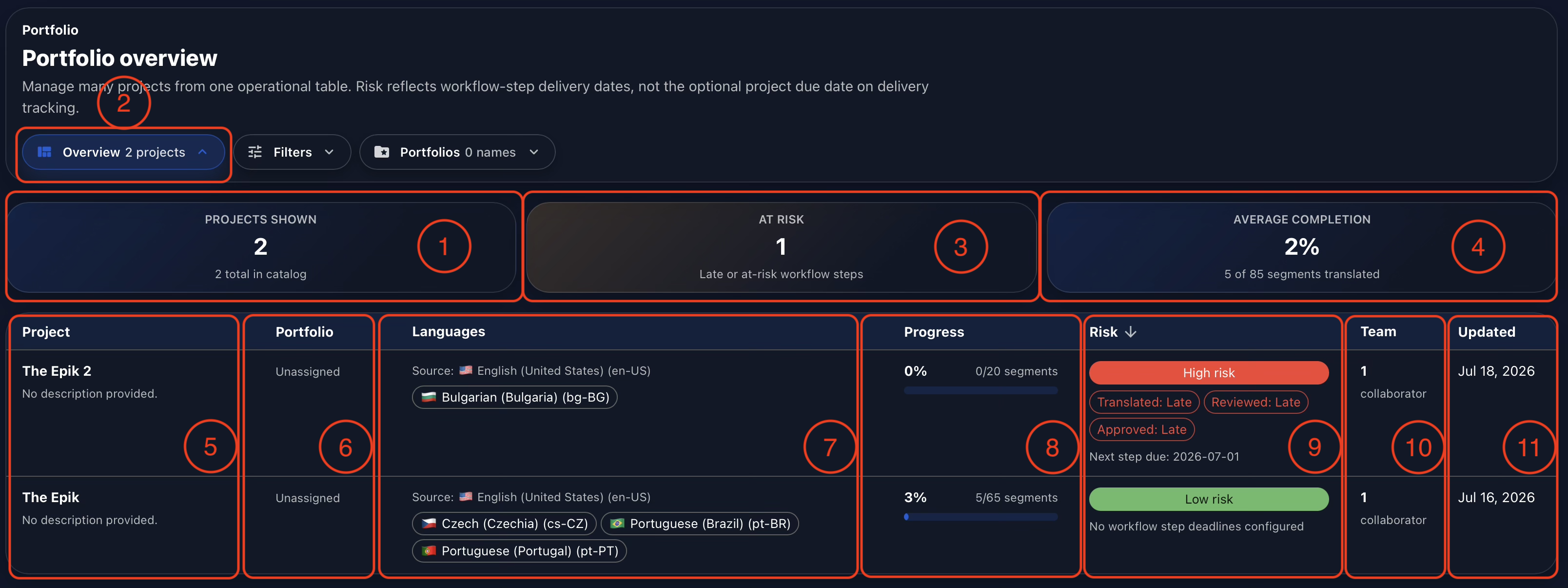
Projects available in Gaia’s catalog are included in the projects-shown card (1) and can be reviewed in the Overview section (2). The at-risk card (3) identifies projects with late or at-risk workflow steps. In the example below, one project is at high risk because its requested workflow-step delivery dates have passed. The average-completion card (4) combines progress across all projects currently shown.
The table provides the operational detail behind those summary cards. Each row shows the project name (5), its assigned portfolio (6), source and target languages (7), current segment progress (8), workflow risk and the steps contributing to it (9), team size (10), and the date of the latest project update (11).
This combination is important. A completion percentage alone cannot explain whether a project needs attention. Portfolio places progress beside deadlines, languages, staffing, and recent activity so that leaders can interpret status in context.
Finding the Projects That Need Attention
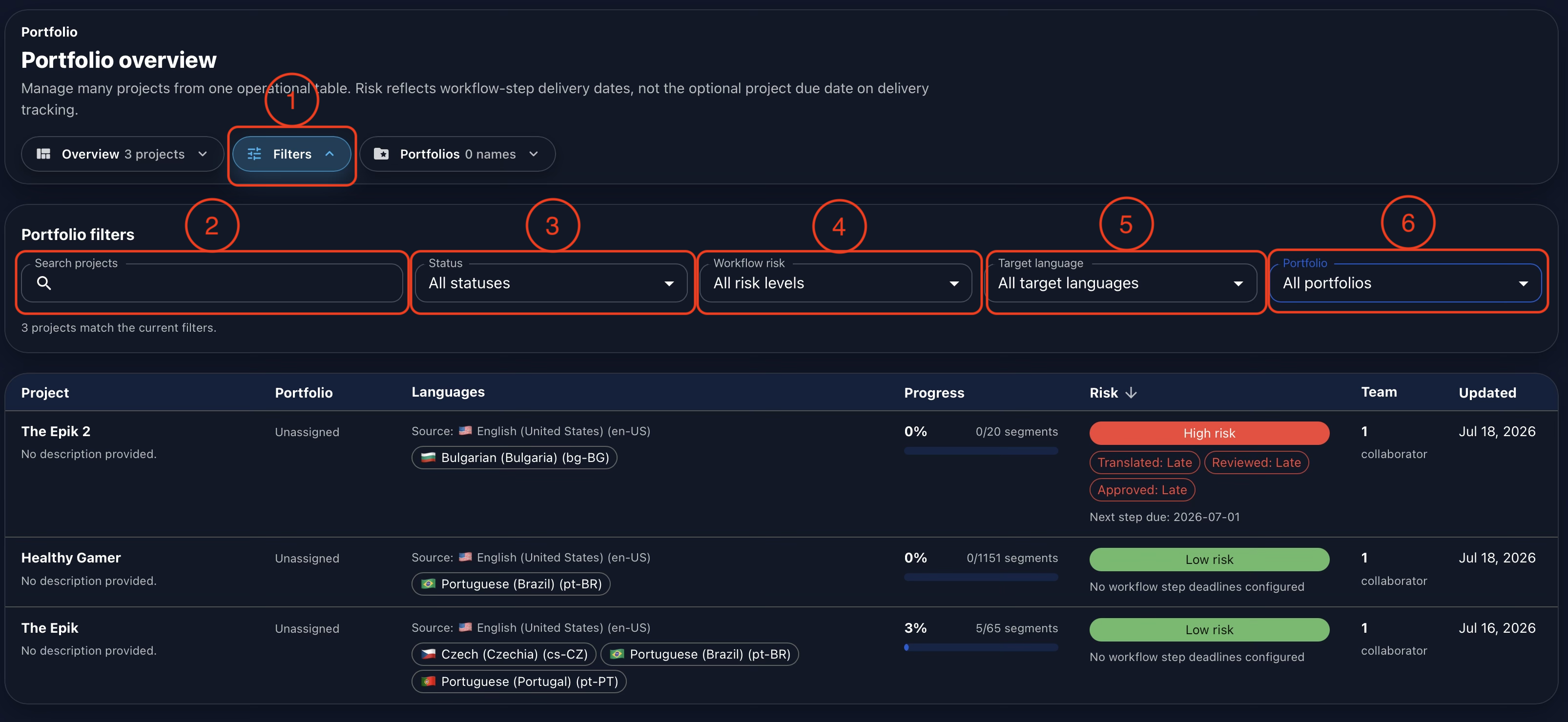
When the catalog contains many active projects, open Filters (1) to narrow the view. Search projects by name (2), select a project status (3), isolate a workflow-risk level (4), choose a target language (5), or display only projects assigned to a specific portfolio (6).
The filters can also be combined. Leadership could, for example, review only high-risk projects for one target language, or examine active work for a particular client portfolio. The result count confirms how many projects match the current selection, while the table keeps the same operational columns for direct comparison.
Creating Focused Portfolio Groups
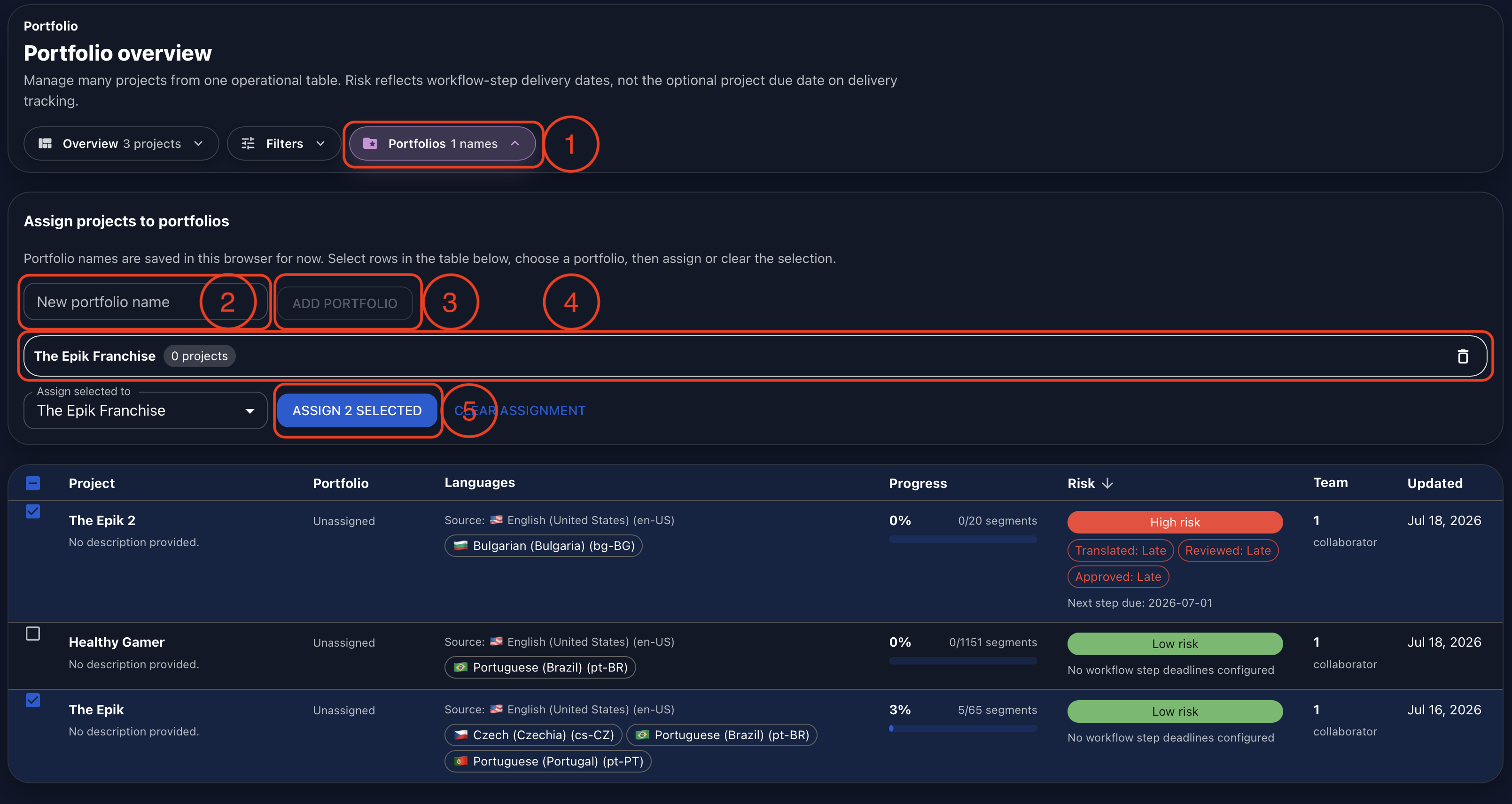
Open Portfolios (1) to group related projects for faster analysis. A portfolio could represent a client, franchise, product line, release program, or any other grouping that helps leadership review connected work together.
Enter a portfolio name (2), then select Add Portfolio (3). After the group is created, Gaia displays its name and the number of assigned projects (4). Select the checkboxes beside the projects you want to group, choose the destination portfolio, and select Assign Selected (5).
In the current implementation, portfolio names and assignments are saved in the browser. This makes the grouping quick to configure for an individual leadership view without changing the underlying project setup. The assigned name then appears in the Portfolio column and becomes available as a filter.
From Status Reporting to Leadership Action
Portfolio is most useful when it becomes part of a regular operating rhythm. Leaders can begin with the at-risk count, use the table to identify the workflow steps behind that risk, and filter the view to the relevant portfolio, language, or status. Project managers can then add the operational context that the data alone cannot provide.
The result is a more meaningful conversation between executive, management, and production teams. Gaia supplies the shared evidence; the team decides whether the right response is a staffing adjustment, a deadline discussion, a scope decision, or closer review of a specific project.
Conclusion
Gaia Portfolio gives leadership a straightforward way to understand progress and address delivery challenges across multiple projects. Summary cards make overall status visible, the operational table explains what sits behind those numbers, filters isolate the work that matters, and custom portfolio groups create focused views for related projects.
Most importantly, the view is built from information already present in Gaia. There is no separate formula sheet to maintain and no external reporting connector required for the baseline workflow. Leaders receive a current view of the work, while managers and operational teams gain more time to discuss decisions rather than reconcile reports.
Watch the full demonstration below.
Full Demonstration
The video walks through the full Portfolio workflow, from the executive overview and project table to filters for status, risk, language, and portfolio, plus creating custom portfolio groups for focused leadership analysis.
Follow Tomori Systems on YouTube, Instagram, TikTok, and LinkedIn for more Gaia updates.