Item Creation at Scale
The idea for Forge, now available in Gaia 3.0, grew out of challenges I experienced while working as a localization reviewer and team lead. My team was localizing an MMO, which meant handling the daunting volume of armour, weapons, accessories, abilities, and other named game content that comes with a large online world.
Volume was only part of the problem. Item names that were simple to assemble in English often became much harder to manage once localization began. The linguistic rules that shape a natural item name can differ considerably from one language to another, even when the intended meaning remains the same.
Why Item Names Become a Localization Problem
Word order is one common source of friction. English usually places an adjective before its noun, and game content often stacks several qualifiers in that position. Many target languages prefer a different order, and additional qualifiers may need to move or be rewritten for the complete name to sound natural.
Grammatical gender adds another layer. English can use the adjective Epic unchanged in both Epic Sword and Epic Bow. In languages with gender agreement, however, the translated adjective may change with the noun. Number, case, articles, contractions, and connector forms can create similar dependencies.
These differences may look small in isolation. Across hundreds or thousands of items, they become a production problem: every source-language shortcut can multiply into manual localization work, inconsistent naming, or special-case implementation logic.
When Concatenation Moves the Work Downstream
Developers and writers understandably build source-content systems around the language in which they are authoring. A formula such as adjective + space + noun can be an efficient way to produce many English item names from a small set of components.
The difficulty appears when that formula is treated as universal. A fixed order may not work in the target language, and a reusable adjective may require several inflected forms. The source team gains efficiency, but localization teams must manually repair the generated names. Engineering may then need to make the runtime flexible enough to combine different strings in different orders for every locale.
Forge addresses that challenge earlier. It keeps the efficiency of slot-based item creation while allowing each language to define how those slots should be arranged and written.
A Shared Workspace for Creation and Localization
Forge is Gaia’s dedicated environment for creating English item names and their localized versions. Nouns, qualifiers, and connectors are organized in one matrix, but each language can assemble those components in the order its grammar requires.
The result is a single workflow for content creators and localization teams, connected to Gaia’s Glossary, Translation Memory, and Translation Grid. Teams can build, preview, submit, search, and reuse item names without maintaining a separate spreadsheet outside the project’s production environment.
The Forge Overview
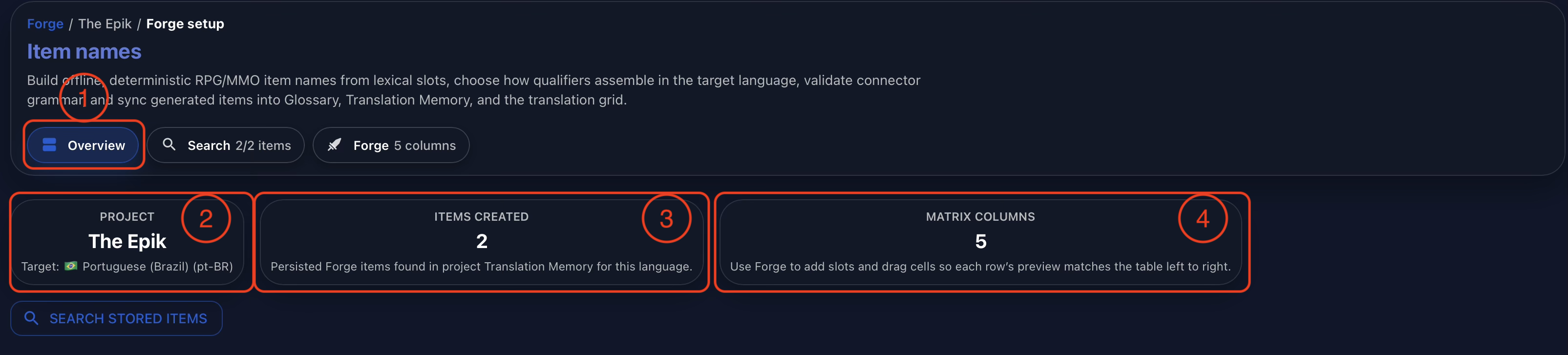
Forge opens with an overview of the active item-naming project. The navigation identifies the Overview tab (1), while the summary cards show the selected project and target language (2), the number of items already created (3), and the number of columns currently available in the Forge matrix (4).
This compact view gives the team an immediate sense of the workspace before they search existing items or return to the matrix to create new ones.
Searching Stored Items
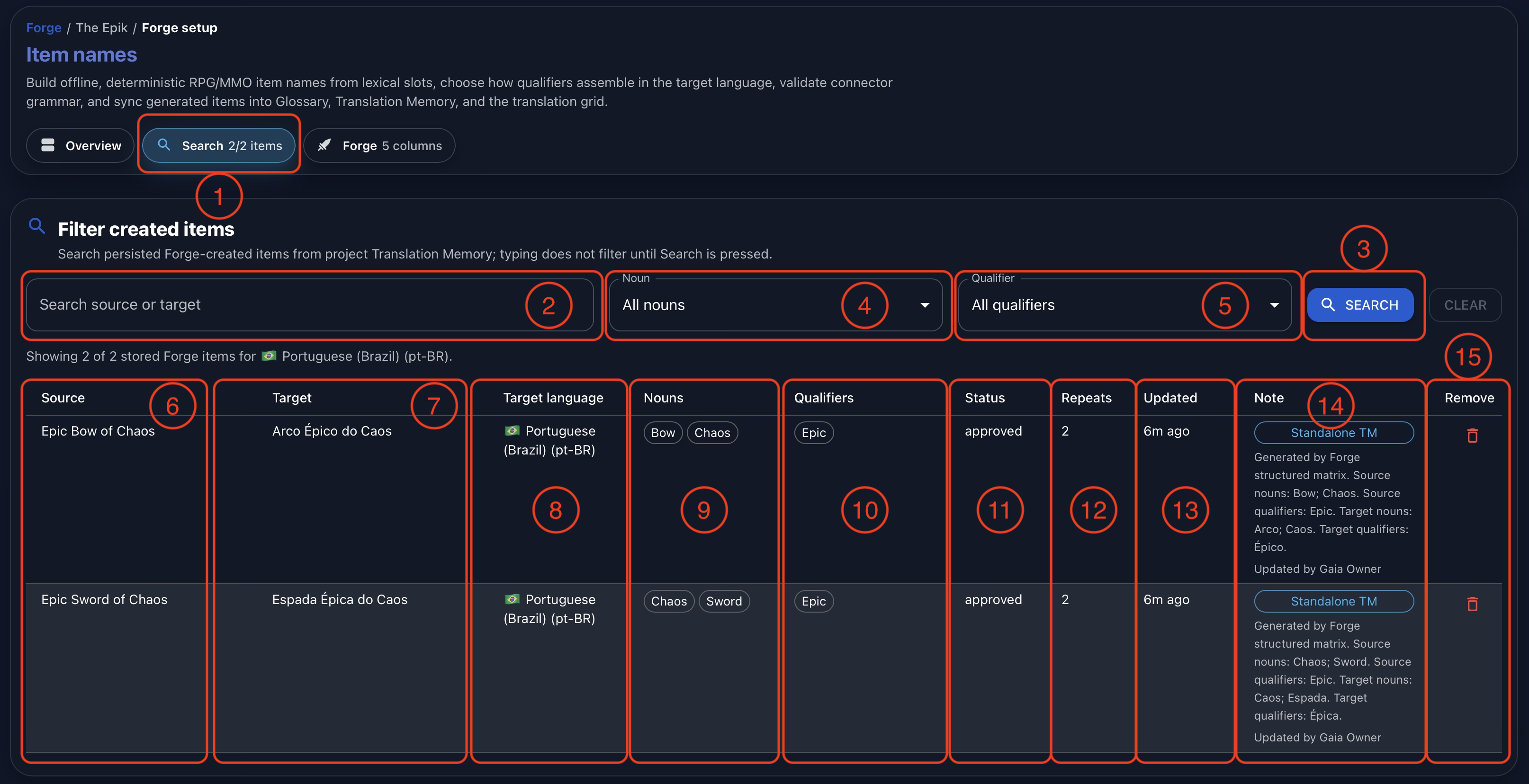
Select Search (1) to review the items already stored for the project. Enter source or target text in the search field (2), then run the search (3). The noun (4) and qualifier (5) filters make it possible to focus on a particular family of items even when the project contains a large inventory.
Each result keeps the complete item name beside its lexical structure. The table shows the source (6), target (7), target language (8), nouns (9), and qualifiers (10). It also records the workflow status (11), number of repeated entries found (12), most recent update (13), and implementation note (14). The final control (15) lets an authorized user flag the stored item for removal.
This turns Forge into more than a generator. Teams can trace how an item was assembled, find related names, and review the production state of each source-and-target pair from the same place.
Building Item Names in the Forge Matrix
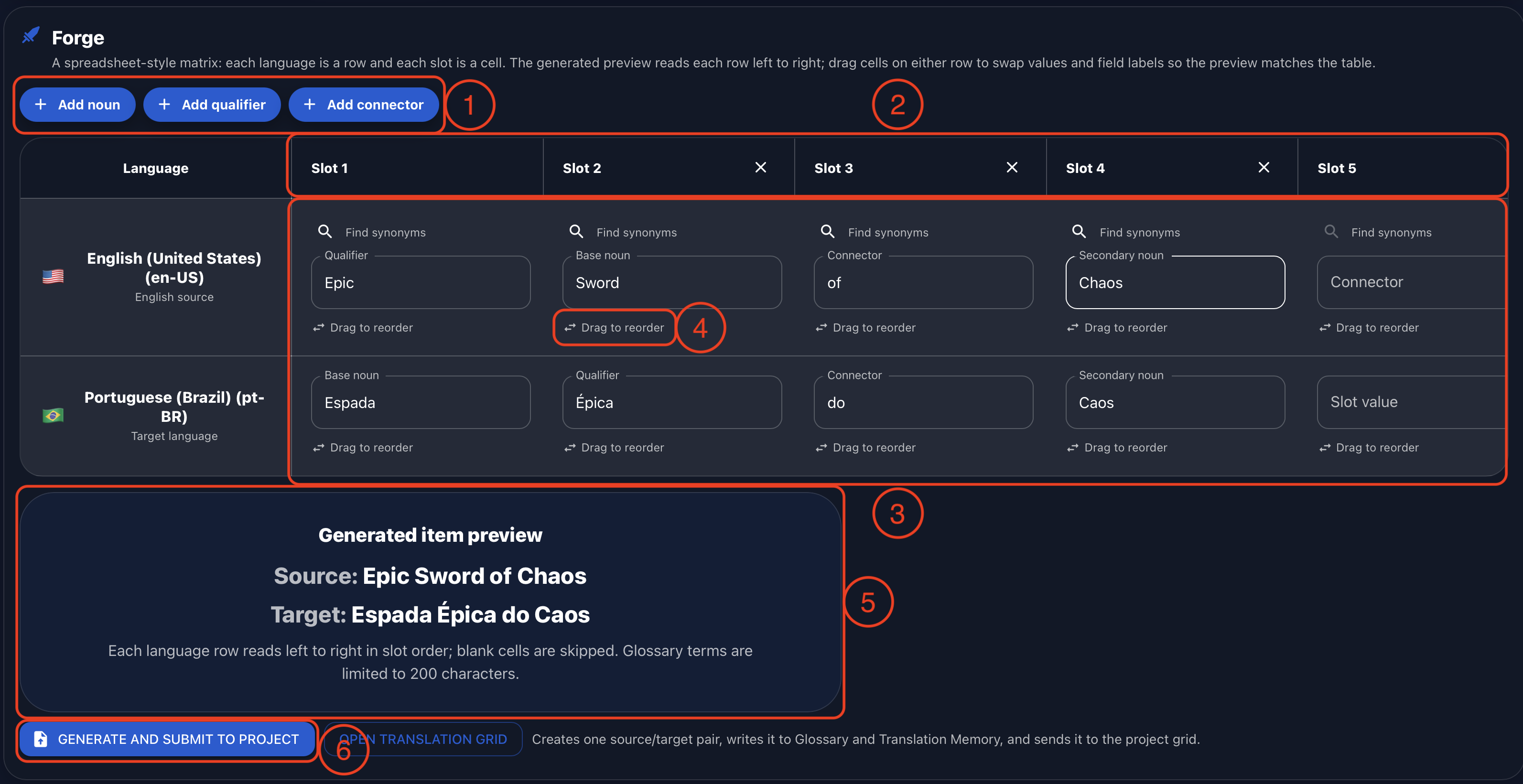
The Forge itself uses a spreadsheet-style matrix by design. The controls at the top add nouns, qualifiers, or connectors (1), and each addition creates another slot in the matrix (2). Every language occupies its own row (3), with a value and grammatical role for each active slot.
Cells can be dragged to reorder them independently for each language (4). This is where Forge preserves meaning without imposing English syntax. In the example below, the source is assembled as Epic Sword of Chaos, while Brazilian Portuguese uses Espada Épica do Caos. The qualifier moves after the noun, and the connector takes the form required by the target phrase.
The generated item preview (5) updates as the matrix changes, so users can check both languages before committing the result. When the item is ready, Generate and Submit to Project (6) creates the source-and-target pair, writes it to the Glossary and Translation Memory, and sends it to the project’s Translation Grid.
From Naming Tool to Production Workflow
Forge brings item creation, localization, and terminology management into one connected process. Content creators retain the speed of reusable components, linguists can apply the grammar their language actually needs, and reviewers can inspect the finished names alongside their structure and production metadata.
Because submitted items feed the same Glossary, Translation Memory, and Translation Grid used by the rest of Gaia, naming decisions do not remain trapped in a separate worksheet. They become reusable project resources that can support consistency throughout the game.
Conclusion
Gaia was built to address the practical challenges of modern localization, and Forge was designed specifically for the scale and linguistic complexity of item creation in MMOs, RPGs, and action-adventure games.
Its matrix, live preview, language-specific slot order, searchable inventory, and direct integration with Gaia’s localization resources help teams create more item names without treating quality as an afterthought. The goal is straightforward: preserve the productivity of structured content creation while giving every target language the flexibility it needs to sound natural and precise.
Watch the full demonstration below.
Full Demonstration
The video walks through the full Forge workflow, from the overview and searching stored items to the matrix, language-specific slot order, live preview, and submitting names into Gaia’s Glossary, Translation Memory, and Translation Grid.
Follow Tomori Systems on YouTube, Instagram, TikTok, and LinkedIn for more Gaia updates.